


Brief Introduction to Selenium-HTML Scripting With IDE
If you don't have selenium IDE, Go here.
Two major features of Selenium IDE are record and play. Selenium starts recording if the red button on the right hand corner is on. Script is divided into three different parts: Command, Target and Value. Selenium has three types of commands; Actions, Accessors and Assertions. Actions are the actions such as click or type. Accessors test the state of the applications and store the results in variables. Assertions are used to compare the actual result with the expected result. They
have 'verify' 'assert' and 'waitFor' prefix. During recording user can
simply right click and add these assertion for verification purpose or
can be added later on.'waitFor'
command waits until some condition is true. They do not wait if
targeted condition is met but wait for some time if something is in
progress.
Common Selenium commands recorded by IDE are: open, type, click, click.., select, ...AndWait suffix eg clickAndWait, addSelection and etc.
What is the difference between verify and assert? when to use what?
When assert fails, current test script stops running and test in progress jumps to another test script. When verify fails, it logs the error but same script keeps running. So when to use what is your choice. But you can always borrow some idea from best practice.
If you are verifying many elements is present in a page, you can 'assert' the title of the page to make sure you are in the right page. If you are in the wrong page, its OK even script stops running right?
Assert is best used for critical part of the application, such as log-in verification. Once you are logged in with an username you can assert that particular used name is there.
Selenium IDE is widely used to record the script and export into other programming languages such as Java, C#, Python and Ruby. You export script to your desired environment/framework such as Junit, TestNG and run your test from there. If you wish to run with TestRunner, you can save your script as a .html file and run it. Please go here to learn more about it.
Selenium IDE is widely used to record the script and export into other programming languages such as Java, C#, Python and Ruby. You export script to your desired environment/framework such as Junit, TestNG and run your test from there. If you wish to run with TestRunner, you can save your script as a .html file and run it. Please go here to learn more about it.
Some Rules in Java:
- A source code file can have only one public class and may have multiple non-public class
- A public class file name must match the public class name.
- A file can have only one package statement and it must be the first line in the source code.
- A file can have multiple imports.
- Import statement is applicable to all classes in the source code file
- If a class cannot be accessed, its members (methods and instance variables) cannot be accessed either.
- A subclass can inherit a member of its super-class.A subclass can only extend one parent.
- A class access determines its members' access. If a class cannot be access, its member's cannot be accessed either.
- 'this.' means currently executing object.
- Private members cannot be inherited.
Java - Package
What is a package?
A package is a kind of directory that contains a group of related classes and interfaces. Packages hides its class and interfaces in a separate directory. Java has many such packages it its library. If you want to use a classes, you have to import it into your program. If you want to use a method, then you have to import the corresponding class or interface.
A group of package is called library. Any class and interface inside a package is reusable.When a package is imported, its sub-packages are not automatically imported into a program. A separate import statement should be written to for every package or sub-package.
Java library
|
Packages
|
Classless and interfaces
|
methods
There are two different types of packages.
1. build-in
2. User defined
Build -in Packages
Build -in packages are already available in Java. These packages provide all necessary classes, interfaces and methods to perform tasks. Some important packages are:
java.lang: This package has primary classes and interfaces for developing a basic Java program.
java.util: It has many useful collections. Date, time operations, victors...
java.awt: awt stands for Abstract Window Toolkit.This package is useful for developing GUI-color, paintings, images etc. It consists one important sub-package java.awt.event. It provides actions like select radio button, menu etc.
javax.swing: Helpful for GUI. It is an extended package of java,awt(package developed from another package by adding new features). 'x' represents it as an extended package.
java.net: Useful for authentication for network, creating sockets, to establish communication between client-server.
java.applet: Related to Java applets.
java.text: It contains two important classes. 'DateFormat' is to format date and time. 'NumberFormat' is to format numeric values.
java.sql: Helps to connects to the database like oracle, retrieve and use data in Java program.
User-Defined Package:
Package created by user. User defined package can be used exactly same way as the build-in package.
The keyword to create a package is package.
Features related to the Object Oriented Programming Systems(OOPS)
The root concept of the object oriented programming(OOP) is 'Object' and developing programs using class and object. OOP languages allow programmers to use and reuse the same modules multiple times.You yourself are an 'object'. Tell me about yourself,(properties) - name - yoyo, age- 28.What can you do(methods) eating-eat(), running - run()
In JAVA there is a main task to perform(Main method). That one task is divided into many modules(classes). Each class can perform certain task. Many methods are written inside a class to perform actions with data(variable). So variables and methods are also called 'members' of the class.
Some features of OOP are
Class/object:
Access Specifiers:
An access specifier is a key word that specifies how to access the member of classes or a class itself. There are four access specifiers in Java:
Private: 'Private' members of a class are not accessible anywhere outside the class. They are accessible only within the class by the methods of that class.
Public: Public member of a class are accessible from everywhere.
Protected: Accessible outside the class but only within the same directory.
Default: If not specified by a programmer, it is 'default' . Default members are accessible outside the class, bur within the same directory.Private for instance variable. Public for methods, class.
Constructors:
Encapsulations:
Abstractions
Inheritances
Polymorphism
Selenium IDE and its useful features
Selenium IDE, a Firefox extension is the easiest way to record, edit, debug and run web test. Selenium is a web application testing system and selenium IDE (sometime refereed as SIDE) is a part of it. Once download, it appears as a Firefox plug-in under 'tools'. Selenium IDE works only with Firefox browser. A Selenium test recorded in Selenium IDE can be run in other browsers with the Selenium Server.
Installation:
You can download Selenium IDE from:
If you want to open it, lunch the Firefox browser then go to, Tool > Selenium IDE. You will see the following window.

Selenium IDE is a lightweight tool and it doesn't have a lot of features as well. Some of the important features are:
Base URL: Base URL of the application. Selenium IDE automatically captures it.
User Extensions: You can add new actions and assertions in selenium IDE with JavaScript. Create your own user-extension and save it as .js file. Go to Tools > Options and browse your js file here. Next time when you open lunch your Selenium IDE, it will be available in command drop-down. To learn more about Selenium User Extension visit here.
Test Case and Test suite:
Under 'file' menu there are options to open, save, save as and export test case and test suite. Saving as a test suite help to create a test suite and add test cases inside it.
Help:
Help takes you to "Selenium UI-Element Reference". If you are a beginner, it is a place worth visiting.
Selenium HTML-Testrunner framework with 2.0rc2
There are so many languages and frameworks for selenium, such as JAVA- JUnit framework, and C#- .Net. These are excellent if you are comfortable with one of the languages and tools. It will help you to create dynamic, advanced test framework according to your test need. Moreover, it opens door to use powerful development language in your test. For example if and else logic.
However, this HTML based Test Runner framework is easy and requires low maintenance. It is powerful enough for most of the automation need and you can use javaScript to make your test more meaningful if necessary. You as an automation tester do not need development language either.
However, this HTML based Test Runner framework is easy and requires low maintenance. It is powerful enough for most of the automation need and you can use javaScript to make your test more meaningful if necessary. You as an automation tester do not need development language either.
Please follow these steps if you want to adopt this for your test automation purpose. I have used website Facebook log-in page for this tutorial. I am assuming you know about selenium IDE and recording the recording. If answer is ‘no’ then going to this page and come back here.
Download Selenium Server
- Go to http://seleniumhq.org/download/. It is also known as Selenium Server.
- If you cannot find stable build find from this page: http://code.google.com/p/selenium/downloads/list.
- It is a .ZIP file. Once download is completed unzip it in C:\selenium
- Test it. To test it runs properly follow the following step:
1. Open command line.
2. Go to the folder that contains the selenium server. (You can go using DOS cd command to navigate from one folder to another.). Type following commands: java -jar selenium-server-standalone-2.0rc2.jar. If it runs successfully, you will see the following screen:
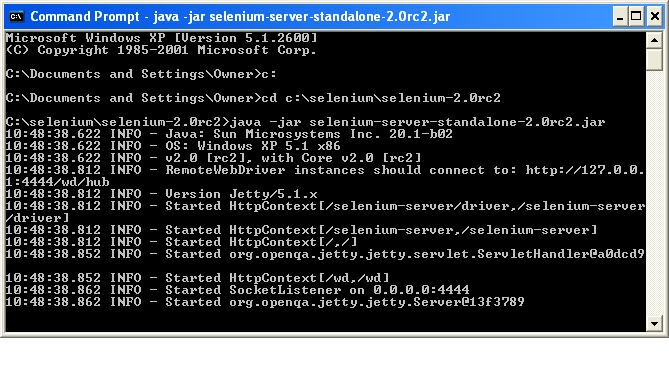
If it doesn't run check the error message. Usually, problem is with the port. Selenium server’s default port is 4444. If it is taken already, problem occurs. Easy solution is to restart your machine.
Subscribe to:
Posts (Atom)