Quick Test Professional(QTP)- Useful Tricks

1. How to create a new action?
-Open QTP
-Insert>call to new action>start recording to create an action
-make sure to check “Reusable action”
-Save it in the QC folder where you can remember

2. How to call an existing action for the existing scripts?
-Open QTP
-Insert>Call to existing Action
-save the called action

3. How to insert “Wait” command in scripts?
Browser("Welcome to the Config").Page("Edit Name_2").WebList("FamilyList").Select "ISE 1.0"
Wait (6)
Browser("Welcome to the Config ").Page("Edit Name_2").WebList("moduleSelect").Exist

4. ReportEvent: With “If-Then-Else” logics
If Browser("Welcome to the Config ").Page("Welcome to the Config ").Link("General").Exist then
Reporter.ReportEvent micPass,"web element","general present"
else
Reporter.ReportEvent micFail,"webelement","General not present"
End if
Browser("Welcome to the Config ").Page("Welcome to the Config ").Link("General").Click

Note: make a copy of your original one line script and replace “Click” with “Exist then” in the copied one.
Click return key and type reporter. And you will see bunch of report events. Select ReportEvent and hit space bar to provide space. You will see bunch of other pop up list. Select “micPass” and provide a comma to it. Afterward put comments and status results inside the double quotes i.e. reporter.ReportEvent micFail,"webelement","general not present". You can see this report in test results.

5. Insert Standard Check Points while recording
If your test case is asking to “delete template”, then when you hit “delete” you will see some kind of confirmation message to make sure the template has been deleted. Put the check point when you see the confirmation message. To insert checkpoints while recording, for instance you want to insert checkpoint for “Confirmation message” and you’ve have not stopped recording yet after clicking “delete”, then in QTP, select insert>checkpoint>standard checkpoint>select the delete confirmation message. Done

6. GetRoProperty:
i.e. if you would like to get properties/value of an object
autofilltext=Browser("Config + Template Editor").Page("Config + Template Editor").WebElement("source_field_name").GetROProperty ("innertext")
msgbox autofilltext
If autofilltext="Velocity Template" Then
Reporter.ReportEvent 0,"Verify the 'Velocity template' box.","successfully identified Velocity template"
Else
Reporter.ReportEvent 1,"Verify the 'Velocity template' box.","Unable to identify Velocity template"
End If

You can give meaningful word to variable autofilltext for message box. Remove any operation i.e. Click right after dot at the end and replace it with GetRoProperty. To get the property of the object whether or not it is innertext or outertext, follow these steps. From QTP select ‘Object Spy’ and point it to the object you want to find its property and click the object. Once the object is clicked, property & values are saved in the Object Spy. Scroll down in the object spy window. You will see whether or not it is innertext or outertext. You can copy and paste it inside the parenthesis right after GetRoProperty.
And type msgbox
In if statement, value after assignment sign is the name of the object. Others are ReportEvent that we talked in Question 5

Note: usually you do not need to show message pop up if you’re running multiple test cases at night as when it pops up, it will stop other test cases to run until you click the pop up. So always comment it out for msgbox i.e. ‘msgbox autofilltext

7. Inserting Breakpoints
Usually break point are good when you don’t want to run whole script but upto some linke of the script.
If you point your mouse to the left side of the screen right next to your script and click to a particular line of the script, you will see big red dot. This is what called break point. Test run will stop to the point where you’ve placed your break point. This is easy tool specially when you’re are creating/testing/debugging scripts.
You can remove break point by clicking at the red dot.

8.How to FireEvent: Script for ‘Double-click’ ?
If you can not record for double clicking some object, you can generate a script for it. Here you got following script
Browser("Config + Template Editor").Page("Welcome to the Config ").WebButton("ABCD").Click
Now make it a double click action. Remove Click and type FireEvent, you will see popup with FireEvent and select it and inside double quotes, type “ondblclick” like the following
Browser("Config + Template Editor").Page("Welcome to the Config ").WebButton("ABCD").FireEvent"ondblclick"

9. How to use of the Data Table ?
Example script: Browser("Browser").Page("abc").WebEdit("USER").Set "ssharma"
a) Parameterization
simply provide multiple data in the same column. If these test data are valid, they qtp will run as many time as you have data
From QTP, Keyword Veiw>Select a value from the value column>click a parameter sign>Parameter>Give the object name in the name field such as USER from above example script. Now it will generate a column in the Global data table.

b) Tracking object values which can be replaced in the latter releases if data is deleted for some reason: from above example if you record a column in the
data table for USER (columnname) and data (ssharma), you can change value ‘ssharma to skhanal 

 10. how to use code/script to call an Excel Sheet?
Create a reusable action and type the following code:
Datatable.addsheet("login")
DataTable.Importsheet ( pathfinder.Locate( "[QualityCenter] Subject\Auto STD Regression Config+\login_info.xls")),"login","login"
For i = 0 to DataTable.GetSheet("login").GetRowCount -1
call Login(DataTable.Value("username", "login"), DataTable.Value("password","login"), DataTable.Value("url","login"))
datatable.Value("Result")="pass"
Next
DataTable.DeleteSheet("login")

11.How to make local object to globally available?
For Local Object Repository:
-Open the test on the QTP editor (Expert View)
-Resource>Object Repository
For Global Object Repository:
-Open the test on the QTP editor (Expert View)
-Resource>Object Repository Manager
You need to have both windows opened and simply drag and drop from local to global.
Once you move to global make sure to save it in the global repository.

12. How to export /import excel sheet?
User can make an Excel sheet with the required parameters and can import it to QTP when necessary. Ater creating excel sheet,open QTP, right click on any of the cells in the Data Table
File>Import.
a window pop-up box appears whether you will want to replace the contents of the current data table with the ones in the excel sheet.
Click OK .


Same way you can export data table into an external excel file. It is useful to use the required parameters in some different test run within QTP.
Or use script - Datatable.Export("path of file")

13. GetItem(1)
getItem(1) function will pick first values in the picklist If Browser("Welcome to the Config").Page("Welcome to the Config ").WebList("FamilyList").Exist Then Browser("Welcome to the Config ").Page("Welcome to the Config ").WebList("FamilyList").GetItem(1) Browser("Welcome to the Config ").Page("Welcome to the Config ").WebList("FamilyList").Select DataTable("FamilyList", dtGlobalSheet) End if

Fundamental of Web - Technologies, Protocols and More

Basic knowledge about web helps a tester lot be a good Web Tester. We everyday browse many web pages but we hardly looks how they are created. The World Wide Web is a way of exchanging information between computers on the Internet. Many technologies, protocols, servers and other components are involved to develop a Web application.

ASP.NET:
ASP.NET; a part of the .NET Framework, can be used to create anything from small, personal websites through to large, enterprise-class web applications. Languages: Visual Basic, C#, JScript .NET, and J# can be used to develop (or language compatible with common language runtime).ASP.NET Web pages are completely object-oriented. Within ASP.NET Web Pages, you can work with HTML elements using properties, methods, and events.


Proxy Server:
  In an enterprise that uses the Internet, a proxy server is a server that acts as an intermediary between a workstation user and the Internet so that the enterprise can ensure security, administrative control, and caching service. A proxy server receives a request for an Internet service (such as a Web page request) from a user. If it passes filtering requirements, the proxy server, assuming it is also a cache server , looks in its local cache of previously downloaded Web pages. If it finds the page, it returns it to the user without needing to forward the request to the Internet. If the page is not in the cache, the proxy server, acting as a client on behalf of the user, uses one of its own IP addresses to request the page from the server out on the Internet. When the page is returned, the proxy server relates it to the original request and forwards it on to the user. To the user, the proxy server is invisible; all Internet requests and returned responses appear to be directly with the addressed Internet server.

Cache:
A cache is a french word meaning 'to store'. It is useful for to make page load faster, to reduce wide area bandwidth usage, to reduce the load placed in origin server. Negative side is it might return out-of-date information to users. Sometime cache may not be able to reach server to return data.

What web protocol is ?
When two or more computers communicate in Internet , they must have a common way in which to communicate. They use protocol to do it. Simply, protocol is an agreement by which two or more computers can communicate.

TCP/IP
Transmission Control Protocol/Internet Protocol(TCP/IP) is set of Internet communication protocol.
Transfer Control Protocol (TCP) breaks data into small pieces (called Packets) of no bigger than 1500 characters each. Each packet is inserted into different Internet Protocol (IP) “envelopes.” Each contains the address of the intended recipient and has the exact same header as all other envelopes. A router receives the packets and then determines the most efficient way to send the packets to the recipient. Upon arrival at their destination, TCP checks the data for corruption against the header included in each packet. If TCP finds a bad packet, it sends a request that the packet be re-transmitted. Numeric IP address( is a 32-bit address comprised of four 8-bit numbers (28) separated by periods. Each of the four numbers has a value between 0 and 255) works perfectly for web address However instead of IP Address, use of
Uniform Resource Locators (URLs) is in use because of it's user friendliness. So when a human types a URL into a browser, the request is sent to a Domain Name Server (DNS), which then translates the URL to an IP address understood by computers.


SMTP:
Simple Mail Transport Protocol (SMTP) is the network protocol used to send email across the Internet. the messages can then be retrieved with an e-mail client using either POP or IMAP (POP - Post Office Protocol, and IMAP - Internet Message Access Protocol are protocols to retrieve e-mail from server) .

HTTP/HTTPS :
HTTP (Hypertext Transfer Protocol) is the set of rules for transferring files (text, graphic images, sound, video, and other multimedia files) on the World Wide Web. Whenever you surf the web, your browser will be sending HTTP request messages for HTML pages, images, scripts and styles sheets. Web servers handle these requests by returning response messages that contain the requested resource.
HTTP protocol is not suitable for use in a wide range of applications because it can be easily monitored and replayed. For example, someone using a network monitor can easily capture passwords used to access a banking web site. So, HTTP supports the use of several authentication mechanisms to control access to pages and other resources. HTTPs runs over an encrypted SSL session (HTTP over SSL (Secure Sockets Layer)). So, if the website begins with https:// instead of http://, it is a secure site. Client and server need to create a shared secret key by using a public / private key handshake. Typically, HTTP data is sent over TCP/IP port 80, whereas SSL HTTP data is sent over port 443. 
Web have a secure connection or not?:
In Internet Explorer, you will see a lock icon in the Security Status bar. The Security Status bar is located on the right side of the Address bar.
For example this web site is not secure. Security status bar color is red. and there is certification error instead of lock sign.


This website is secured. It has white Security Status bar That means it has normal validation certificate and lock sign is there.

This website is secured. it has green Security Status bar . That means it has extended validation certificate.


Color in web status bar; What it means?
Red: The certificate is out of date, invalid, or has an error. For more information, see "About Certificate Errors" in Related Topics.
Yellow: The authenticity of the certificate or certification authority that issued it cannot be verified. This might indicate a problem with the certification authority's website.
White: The certificate has normal validation. This means that communication between your browser and the website is encrypted. The certification authority makes no assertion about the business practices of the website.
Green: The certificate uses extended validation. This means that communication between your browser and website is encrypted and that the certification authority has confirmed the website is owned or operated by a business that is legally organized under the jurisdiction shown in the certificate and on the Security Status bar. The certification authority makes no assertion about the business practices of the website.

FTP:
File Transfer Protocol (FTP), a standard Internet protocol is the simplest way to exchange files between computers on the Internet. Like the Hypertext Transfer Protocol HTTP which transfers displayable Web pages and related files, and the Simple Mail Transfer Protocol SMTP which transfers e-mail, FTP is an application protocol that uses the Internet's TCP/IP protocols. FTP is commonly used to transfer Web page files from their creator to the computer that acts as their server for everyone on the Internet. It's also commonly used to download programs and other files to your computer from other servers.

DHCP:
Dynamic Host Configuration Protocol (DHCP) is a standard protocol defined by RFC 1541 (which is superseded by RFC 2131) that allows a server to dynamically distribute IP addressing and configuration information to clients. Normally the DHCP server provides the client with at least this basic information: •IP Address,•Subnet Mask,•Default Gateway. Other information can be provided as well, such as Domain Name Service (DNS) server addresses and Windows Internet Name Service (WINS) server addresses. The system administrator configures the DHCP server with the options that are parsed out to the client.

Session :
Session management entails the application sending the client (in most cases, a web browser) a session token after successful authentication. In most cases, this token is passed via the Set-Cookie directive of HTTP and is stored on the client. The session token must then be sent by the client along with every HTTP request to the server to identify itself to the web-based application. The application can then determine whether the client is authorized to access the page being requested.
once a user has authenticated herself to the web server, her next HTTP request (GET or POST) should not cause the web server to ask her for her account and password again. For a discussion of the methods used to accomplish this please see HTTP cookie.
The session information is stored on the web server using the session identifier (session ID) generated as a result of the first (sometimes the first authenticated) request from the end user running a web browser. Web server stores session IDs and the associated session data (user name, account number, etc.).
A cookie is a piece of data that is issued by a server in an HTTP response and stored for future use by the HTTP client. The client then re-supplies the cookie value in subsequent requests to the same server. This mechanism allows the server to store user preferences and identity individual users. Cookies are usually used to represent or reference private information.

Bug Classification - Severity, Priority and Triage

Severity is about the technical impact of a defect. Priority is about the urgency of the fix. Important is that severity is one of the factors influencing priority and that only priority should be used to decide what to fix next . For example, your project may have a policy to fix higher priority bugs p1 before fixing lower (p2 to 4); or to block the release of a product that has open, unfixed p1 bugs; or even require that a p1 bug be fixed immediately (in 4 hours, or the next patch) if it was found in a released, live product. The Severity of open bugs is often used to measure the overall quality of the product, or of a particular feature. Understandably, many projects use bug severity, along with other project or user data, to determine the priority of fixing a bug.

Severity
Sev 1 - System/Application crash, or data loss. Product/Service instability, major test blockage, broken build or failed
new build
Sev 2 - Major loss of functionality or other severe problems (feature unusable; product crashes in obscure cases), Bug in major feature with complex workaround, or moderate test blockage.
Sev 3 - Minor functionality and feature problems; may affect 'fit and finish'. Feature problem with simple workaround, or small test impact.
Sev 4 - Very minor problem such as misspelled words (typos), unclear wording or error messages in low visibility fields, incorrect tab order in GUI, obscure feature broken, etc. Little or no test impact.
Note: Severity, priority ratings vary from company to company,and project to project

Priority
P1 - Fix by next build.

P2 - Should Fix soon, (specific timing based on test/customer “cost” of workaround, if exists.)
P3 - Fix (to replace customer workaround by next project milestone with related deliverable. )
P4 - Consider fix by upcoming release (somewhat trivial ticket, but may be postponed.)

Bug meeting - Triage:
Bug Triage Meeting is project meeting where software developer, software tester and business/product owner are the participants.
In most of the projects I worked, a bug triage meeting, is usually facilitated by test team lead. Triage team steps through each bug one at a time, reviewing about bug's severity, priority, and its impacts on development, test and business.

Bug Life Cycle - BLC


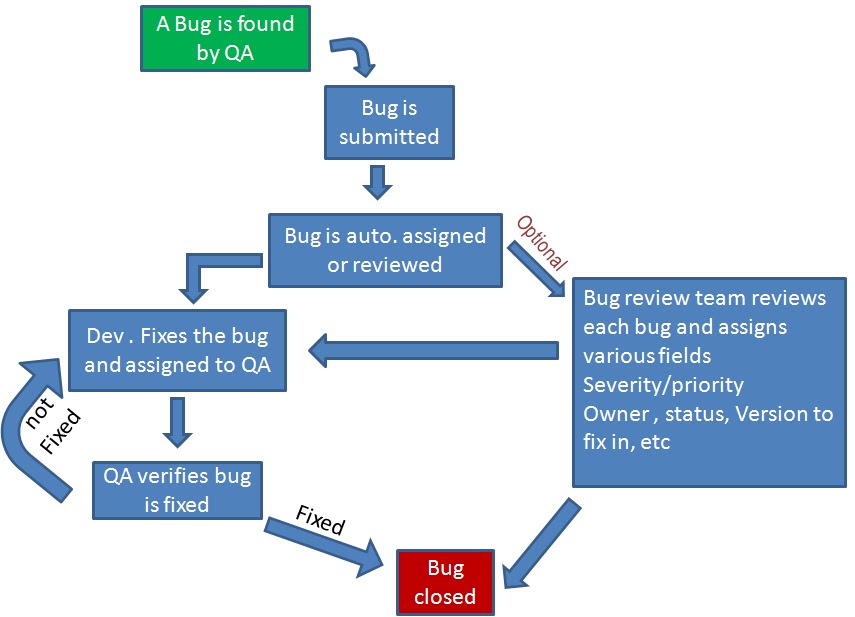
Bug life cycle starts when a bug is found by a tester. After that a tester has to do several things in different point of times.
The very first things to do before logging a bug is to make sure that this issue has already been identified or not. Simply, searching on bug storing database for similar issue. If bug is already has been entered; make sure it is still active and scenario is same that you have identified. If not reopen it and add more information (if repro. steps are different add your ) and bring this issue to developer's/team's attention.
Always avoid entering duplicate bug. Adding duplicate bug effects a tester image .
After tester entering a bug it must be assigned to someone, mostly to developer. (Eventually goes to developer). Developer checks bug and then fixes his code in same build, produces a new build with fix and assign bus to tester to verify it. Now tester needs to verify the fix, which is called regression testing. If bug has been fixed, it is tester's responsibility to close it. If not, the bug will be reactivated and cycle will starts all over again.


Some Useful UNIX Commands for a QA Tester

In a UNIX environment, a tester frequently involves in -
Running scripts as per test case step requirement.
File manipulation (copying/renaming/deleting)
Navigation (change directory/listing files/dictionary)
File/directory creating
Monitoring
remote log in
Using VI/others editors
Search command  grep, find
 The find command is used to search the UNIX system for specific files and/or directories.
 Executing scripts
Creating auto-run of script using cron-tab job

Useful protocols for a software tester

What web protocol is ?
When two or more computers communicate in Internet , they must have a common way in which to communicate. They use protocol to do it. Simply, protocol is an agreement by which two or more computers can communicate.


TCP/IP : 
Transmission Control Protocol/Internet Protocol(TCP/IP) is set of Internet communication protocol. Transfer Control Protocol (TCP) breaks data into small pieces (called Packets) of no bigger than 1500 characters each. Each packet is inserted into different Internet Protocol (IP) “envelopes.” Each contains the address of the intended recipient and has the exact same header as all other envelopes. A router receives the packets and then determines the most efficient way to send the packets to the recipient. Upon arrival at their destination, TCP checks the data for corruption against the header included in each packet. If TCP finds a bad packet, it sends a request that the packet be re-transmitted. Numeric IP address( is a 32-bit address comprised of four 8-bit numbers (28) separated by periods. Each of the four numbers has a value between 0 and 255) works perfectly for web address However instead of IP Address, use of Uniform Resource Locator's (URLs) is in use because of it's user friendliness. So when a human types a URL into a browser, the request is sent to a Domain Name Server (DNS), which then translates the URL to an IP address understood by computers.

HTTP/HTTPS :
HTTP (Hypertext Transfer Protocol) is the set of rules for transferring files (text, graphic images, sound, video, and other multimedia files) on the World Wide Web. Whenever you surf the web, your browser will be sending HTTP request messages for HTML pages, images, scripts and styles sheets. Web servers handle these requests by returning response messages that contain the requested resource.
HTTP protocol is not suitable for use in a wide range of applications because it can be easily monitored and replayed. For example, someone using a network monitor can easily capture passwords used to access a banking web site. So, HTTP supports the use of several authentication mechanisms to control access to pages and other resources. HTTPs runs over an encrypted SSL session (HTTP over SSL (Secure Sockets Layer)) . So, if the website begins with https:// instead of http://, it is a secure site. Client and server need to create a shared secret key by using a public / private key handshake. Typically, HTTP data is sent over TCP/IP port 80, whereas SSL HTTP data is sent over port 443.
Web have a secure connection or not:
In Internet Explorer, you will see a lock icon in the Security Status bar. The Security Status bar is located on the right side of the Address bar. For example this web site is not secure. Security Status bar color is red. and there is certification error instead of lock sign.

This website is secured. It has white Security Status bar That means it has normal validation certificate and lock sign is there.

This website is secured. it has green Security Status bar . That means it has extended validation certificate.
Color in web status bar; What it means? Red The certificate is out of date, invalid, or has an error. For more information, see "About Certificate Errors" in Related Topics. Yellow The authenticity of the certificate or certification authority that issued it cannot be verified. This might indicate a problem with the certification authority's website. White The certificate has normal validation. This means that communication between your browser and the website is encrypted. The certification authority makes no assertion about the business practices of the website. Green The certificate uses extended validation. This means that communication between your browser and website is encrypted and that the certification authority has confirmed the website is owned or operated by a business that is legally organized under the jurisdiction shown in the certificate and on the Security Status bar. The certification authority makes no assertion about the business practices of the website.

FTP: 
File Transfer Protocol (FTP), a standard Internet protocol is the simplest way to exchange files between computers on the Internet. Like the Hypertext Transfer Protocol HTTP which transfers displayable Web pages and related files, and the Simple Mail Transfer Protocol SMTP which transfers e-mail, FTP is an application protocol that uses the Internet's TCP/IP protocols. FTP is commonly used to transfer Web page files from their creator to the computer that acts as their server for everyone on the Internet. It's also commonly used to download programs and other files to your computer from other servers.

SOAP:
Simple Object Access Protocol (SOAP) is a protocol that can be used for accessing the Web pages. SOAP is an XML based Object invocation Protocol. SOAP was developed for distributed applications to communicate through HTTP and firewalls. SOAP messages are independent of any operating system or protocol and may be transported using a variety of Internet protocols including SMTP, MIME, and HTTP 

SMTP:
Simple Mail Transfer Protocol, a protocol for sending email messages between servers. The messages can then be retrieved with an e-mail client using either POP or IMAP

POP:
Post Office Protocol, a protocol used to retrieve e-mail from a mail server to email client. POP stores your email on your computer in your email client (i.e. Thunderbird, Outlook, or whatever program you use to check email). When you check email, it is downloaded to your email client and removed from the mail server. This is why you can read your email when you're offline—because the email is actually on your computer you don't need an Internet connection to see it.

IMAP:

It is a protocol for accessing mail that is in mail server using an email client. IMAP keeps your email on the mail server so you can access it from multiple locations and with multiple email clients. For example, you can see the same email at home and at work. Likewise, you can see it in iCampus, Webmail, and Thunderbird.

MIME: 

SMTP uses the MIME protocol to send binary data across TCP/IP networks. The MIME protocol converts binary data to pure text.

TCP: 

TCP (a network protocols) is used for transmission of data from an application to the network. TCP is responsible for breaking data down into IP packets before they are sent, and for assembling the packets when they arrive. IP is responsible for the sending and receiving data packets over the Internet.

DCHP:
Is responsible for allocating the dynamic IP address to computer in a network. Dynamic Host Configuration Protocol (DHCP) is a standard protocol defined by RFC 1541 (which is superseded by RFC 2131) that allows a server to dynamically distribute IP addressing and configuration information to clients. Normally the DHCP server provides the client with at least this basic information: •IP Address,•Subnet Mask,•Default Gateway. Other information can be provided as well, such as Domain Name Service (DNS) server addresses and Windows Internet Name Service (WINS) server addresses. The system administrator configures the DHCP server with the options that are parsed out to the client.

HTTP:
Hyper Text Transfer Protocol HTTP takes care of the communication between a web server and a web browser. HTTP is used for sending requests from a web client (a browser) to a web server, returning web content (web pages) from the server back to the client. HTTPs run over an encrypted SSL session (HTTP over SSL (Secure Sockets Layer)). So, if the website begins with https:// instead of http://, it is a secure site. Client and server need to create a shared secret key by using a public / private key handshake. Typically, HTTP data is sent over TCP/IP port 80, whereas SSL HTTP data is sent over port 443.
FTP - FTP refers to a network protocol responsible for transferring files from one computer to another on the Internet. The FTP service is provided through a TCP network protocol. In order to establish an FTP connection the user needs to point his FTP client to an FTP server. The information needed includes an FTP host, FTP account credentials (username or password) and a FTP port. The default command port for FTP connections is port 21.

ICMP:
Internet Control Message Protocol takes care of error-handling in the network. It is chiefly used by networked computers' operating systems to send error messages—indicating, for instance, that a requested service is not available or that a host or router could not be reached

SNMP:
Simple Network Management Protocol. It is used mostly in network management systems to monitor network-attached devices for conditions that warrant administrative attention

Software Testing Techniques

Testing Techniques can be divided into following

Specification-based - black-box techniques
Structure-based - white-box techniques
Experience-based techniques


White-box techniques (Structure Based):
This is a software testing technique whereby explicit knowledge of the internal workings of the item being tested is used to select the test data. Unlike black box testing, white box testing uses specific knowledge of programming code to examine outputs. The tests written based on the white box testing strategy incorporate coverage of the code written, branches, paths, statements and internal logic of the code etc.
Usually Unit testing, component testing are the white-box testing. But  it is equally important in integration level as well to verify one module calls another module in a right way.
Structural testing has well defined way of testing. which are defined as -


Statement Testing: It is a component level testing and tests single statements.
Loop Testing: Propose of loop testing is to validating loop constructs. Usually tests-loop to be skipped, loop to be executed more than once, loop to be executed just once
Path Testing: will discuss later
Condition/Branch Testing:  Validating all possible output in specific condition. For every decision, each branch need to be executede at least once. IF, for while, Switch

IF ( a = b) THEN
    Statement 1
ELSE
    statement 2
END IF


Experience-based techniques:
Experienced-based testing is where tests are derived from the tester’s skill and intuition and their experience with similar applications and technologies. it is useful in identifying special tests not easily captured by formal techniques, especially when applied after more formal approaches.
A commonly used experienced-based technique is error guessing. Generally testers anticipate defects based on experience.

Black-Box  (Specification based):
Testing software based on output requirements and without any knowledge of the internal structure or coding in the program.

Techniques:
Equivalent Partitioning
Boundary Value Analysis
State Transition Testing
Cause- Effect Graphing
Syntax Testing
Use case testing
Equivalence partitioning (EP) is a test case design technique that is based on the premise that the inputs and outputs of a component can be partitioned into classes that, according to the component's specification, will be treated similarly by the component.. Thus the result of testing a single value from an equivalence partition is considered representative of the complete partition.As an example consider any program that accepts days of ht week and months of they year as inputs. Intuitively you would probably not expect to have to test every date of the year. You would obviously try months with 30 days (e.g. June) and months with 31 days (e.g. January) and you may even remember to try out the special case of February for both non-leap year (28 days) and leap years (29 days). Equally, looking at the days of the week you would not, depending on the application, test every day. You may test for weekdays (e.g. Tuesday) and weekends (e.g. Sunday). What you are in effect doing is deciding on equivalence classes for the set of data in question.Not everyone will necessarily pick the same equivalence classes; there is some subjectivity involved. But the basic assumption you are making is that anyone value from the equivalence, class, is as good as any other when we come to design the test.We hope that you can see how this technique can dramatically reduce the number of tests that you may have for a particular software component.

Boundary Value Analysis is base on the following premise. Firstly, the inputs and outputs of a component can be partitioned into classes that, according to the component's specification, will be treated similarly by the component and, secondly, that developers are prone to marking errors in their treatment of the boundaries of these classes. Thus test cases are generated to exercise these boundaries.State transition testing focuses on the testing of transitions from one state (e.g., open, closed) of an object (e.g., an account) to another state.
A cause-effect graph is a graphical representation of inputs (causes) with their associated outputs (effects), which can be used to design test cases. Furthermore, cause-effect graphs contain directed arcs that represent logical relationships between causes and effects. Each arc can be influenced by Boolean operators. Such graphs can be used to design test cases, which can directly be derived from the graph or to visualize and measure the completeness and the clearness of a test model for the tester.
Syntax Based Testing is a techniques in which syntax command generator generates test cases based on the syntax rules of a system. Every input has a syntax. Both valid and invalid values are created. It is a data-driven black-box testing techniques for testing input data to language processor, such as string processor and compilers. test Cases are based on rigid data definition.
Test execution automation is essential for syntax testing because this method produces a large number of tests.
Use case testing
Decision table testing: Decision tables are a good way to capture system requirements that contain logical conditions, and to document internal system design. They may be used to record complex business rules that as system is to implement. The specification is analyzed, and conditions and actions of the system are identified. The input conditions and actions are most often stated in such a way that they can either be true or false (Boolean). The decision table contains the triggering conditions, often combination of true and false for all input conditions, and the resulting actions for each combination of conditions. Each column of the table corresponds to a business rule that defines a unique combination of conditions, which result in the execution of the actions associated with that rule. The coverage standard commonly used with decision table testing is to have at least one test per column, which typically involves covering all combination of triggering conditions.