
There are so many languages and frameworks for selenium, such as JAVA- JUnit framework, and C#- .Net. These are excellent if you are comfortable with one of the languages and tools. It will help you to create dynamic, advanced test framework according to your test need. Moreover, it opens door to use powerful development language in your test. For example if and else logic.
However, this HTML based Test Runner framework is easy and requires low maintenance. It is powerful enough for most of the automation need and you can use javaScript to make your test more meaningful if necessary. You as an automation tester do not need development language either.
However, this HTML based Test Runner framework is easy and requires low maintenance. It is powerful enough for most of the automation need and you can use javaScript to make your test more meaningful if necessary. You as an automation tester do not need development language either.
Please follow these steps if you want to adopt this for your test automation purpose. I have used website Facebook log-in page for this tutorial. I am assuming you know about selenium IDE and recording the recording. If answer is ‘no’ then going to this page and come back here.
Download Selenium Server
- Go to http://seleniumhq.org/download/. It is also known as Selenium Server.
- If you cannot find stable build find from this page: http://code.google.com/p/selenium/downloads/list.
- It is a .ZIP file. Once download is completed unzip it in C:\selenium
- Test it. To test it runs properly follow the following step:
1. Open command line.
2. Go to the folder that contains the selenium server. (You can go using DOS cd command to navigate from one folder to another.). Type following commands: java -jar selenium-server-standalone-2.0rc2.jar. If it runs successfully, you will see the following screen:
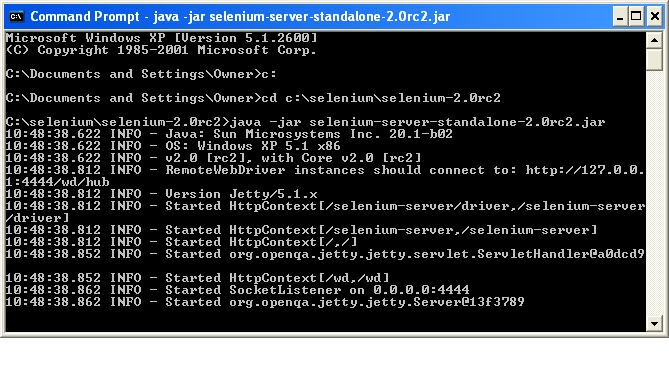
If it doesn't run check the error message. Usually, problem is with the port. Selenium server’s default port is 4444. If it is taken already, problem occurs. Easy solution is to restart your machine.

